
AR
لقد مررنا جميعاً بهذه التجربة. تجد صفقة تكاد تكون أفضل من أن تكون حقيقية. موقع إلكتروني مبهرج يعرض حقيبة يد مصممة بنصف السعر. أو أداة تقنية متوفرة بشكل غامض هنا فقط. ولكن قبل أن تنقر على "اشترِ الآن"، هناك سؤال كبير يجب أن تطرحه:
هل هذا الموقع آمن حتى؟
هنا يأتي دور أداة التحقق من المواقع الإلكترونية الاحتيالية - مساعدك الرقمي لاكتشاف المواقع المشبوهة قبل أن تستنزف محفظتك (وثقتك في الإنسانية).
فكر في الأمر وكأنه جهاز كشف الكذب على الإنترنت. أداة التحقق من مواقع الويب الاحتيالية، وتسمى أيضًا أداة التحقق من عناوين URL أو أداة التحقق من شرعية الموقع، تحلل بسرعة موقع الويب وتخبرك ما إذا كان من المحتمل أن يكون آمنًا أو غير آمن.
يبحث في أشياء مثل
في الأساس، يقوم بكل أعمال التحري الرقمية حتى لا تضطر إلى ذلك.
خبر سار: لست بحاجة إلى أن تكون عبقرياً في التكنولوجيا. استخدام أداتنا سهل مثل النسخ واللصق والنقر.
إليك الطريقة:
نصيحة للمحترفين: ألست متأكداً مما تعنيه النتيجة؟ لا تقلق - نحن نوضح لك ذلك بلغة إنجليزية بسيطة. لا يوجد كلام مهووس هنا.
كل من ScamAdviser و VirusTotal هما أداتان مصممتان لمساعدتك على الابتعاد عن التهديدات عبر الإنترنت - لكنهما مصممتان لمهام مختلفة قليلاً.
VirusTotal أشبه بمجهر رقمي. فهو يفحص الملفات وعناوين URL باستخدام أكثر من 70 محركاً لمكافحة الفيروسات وقواعد بيانات القائمة السوداء. إذا كنت محترفاً في مجال الأمن السيبراني أو قمت بتنزيل شيء مريب، فإن VirusTotal هو ما تبحث عنه. يمكنك تحميل ملف، أو لصق رابط، أو حتى استخدام واجهة برمجة التطبيقات الخاصة بهم لإجراء عمليات فحص عميقة بحثاً عن البرمجيات الخبيثة أو محاولات التصيد الاحتيالي. إنه قوي وتقني ومستخدم على نطاق واسع من قبل الباحثين والفرق الأمنية.
أمابرنامج ScamAdviser، من ناحية أخرى، فهو صديقك الذكي في الشارع. فهو لا يبحث فقط عن البرمجيات الخبيثة، بل ينظر إلى الصورة الأكبر. من يملك الموقع؟ ما هو عمر النطاق؟ هل يزوره أشخاص حقيقيون، أم أنه مدينة أشباح رقمية؟ تمنحك درجة الثقة في ScamAdviser إجابة سريعة وسهلة الفهم: هل من المحتمل أن يكون هذا الموقع عملية احتيال؟
باختصار:
استخدم كلاهما معاً، وستحصل على مزيج قوي لاكتشاف عمليات الاحتيال.
ScamAdviser ليس مجرد أداة، بل هو أداة مراقبة عالمية. نحن نعمل باستمرار على تحسين أداة التدقيق الخاصة بنا لتلبية الاحتياجات المحلية، بالشراكة مع منظمات حماية المستهلك الموثوق بها مثل DECO Proteste في البرتغال وغيرها في جميع أنحاء أوروبا وآسيا وأفريقيا. وهذا يعني أن برنامج ScamAdviser يتحدث لغتك (حرفيًا) ويمكنه الإبلاغ عن اتجاهات الاحتيال الخاصة بكل منطقة قد لا تراها في أي مكان آخر.
نحن نعمل أيضاً من وراء الكواليس مع باحثي الأمن السيبراني، وجهات إنفاذ القانون، والحكومات لإغلاق المواقع الاحتيالية والحفاظ على شبكة الإنترنت أكثر أماناً للجميع.
لذلك عند استخدامك لبرنامج ScamAdviser، فأنت لا تتحقق من موقع ما فحسب، بل تنضم إلى شبكة عالمية لمكافحة الاحتيال.
في بعض الأحيان يكون حدسك يعرف بالفعل. ولكن إذا كنت غير متأكد، فإليك بعض الإشارات الكلاسيكية لمواقع الاحتيال:
إذا كنت ترى اثنين أو أكثر من هذه المراجعات؟ حان الوقت للضغط على زر الرجوع.
أولاً، خذ نفساً عميقاً. هذا يحدث.
إليك ما عليك فعله:
الأخبار السيئة: أصبح المحتالون أكثر ذكاءً.
الخبر السار: وأنت كذلك.
إليك كيفية الحفاظ على حمايتك الرقمية:
اكتشاف عمليات الاحتيال لا يتوقف عند سطح المكتب. يضع تطبيق ScamAdviser، المتاح على نظامي iOS و Android، قوة أداة التحقق من المواقع الإلكترونية في جيبك مباشرةً. سواء أكنت تتسوق من هاتفك أو تتحقق من رابط مشبوه أرسله لك شخص ما عبر رسالة نصية، يمكنك الحصول على نتائج فورية للتحقق من الثقة في أي وقت وفي أي مكان.
لم تكن الحماية من الاحتيال أكثر سهولة من الآن أكثر من أي وقت مضى.
إن الإنترنت يشبه إلى حد ما الغرب المتوحش - مليء بالصفقات الرائعة والمحتالين الرقميين.
ولكن مع أداة مثل أداة التحقق من مواقع الويب الاحتيالية الخاصة ب ScamAdviser، ستحصل على أداة موثوقة للقبض على الأشرار قبل أن يهاجموا.
في المرة القادمة عندما تتساءل، "هل هذا الموقع آمن؟ تحقق من ذلك.
جرب أداة التحقق من مواقع الويب الخاصة ب ScamAdviser الآن - إنها مجانية وسريعة وقد تنقذك من كابوس الاحتيال.
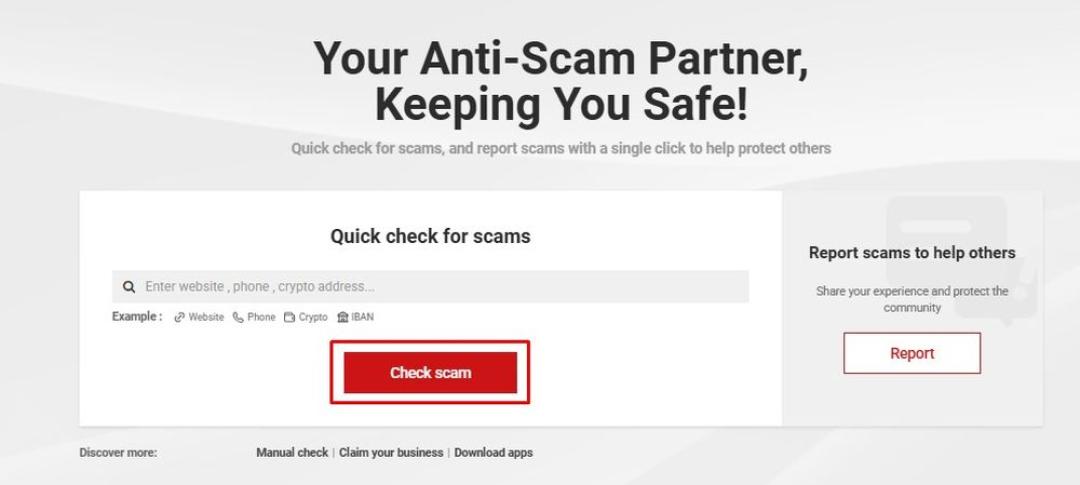
Simply put the website domain, phone number, crypto address, or IBAN and hit “Check Scam” (Image Credit: ScamAdviser)
The ScamAdviser Trust Score is a number between 1 and 100 that shows how likely a website is to be safe and trustworthy. A higher score means the site has more positive signals, while a lower score means ScamAdviser found more warning signs.
The score is a risk indicator, not a final verdict. ScamAdviser checks more than 40 independent data sources, and no single signal decides the result. You can read the full explanation in the ScamAdviser Trust Score guide.
A low score deserves more research before you continue. A high score still requires caution because legitimate websites can be hacked, business details can change, and marketplace sellers may act independently from the platform.
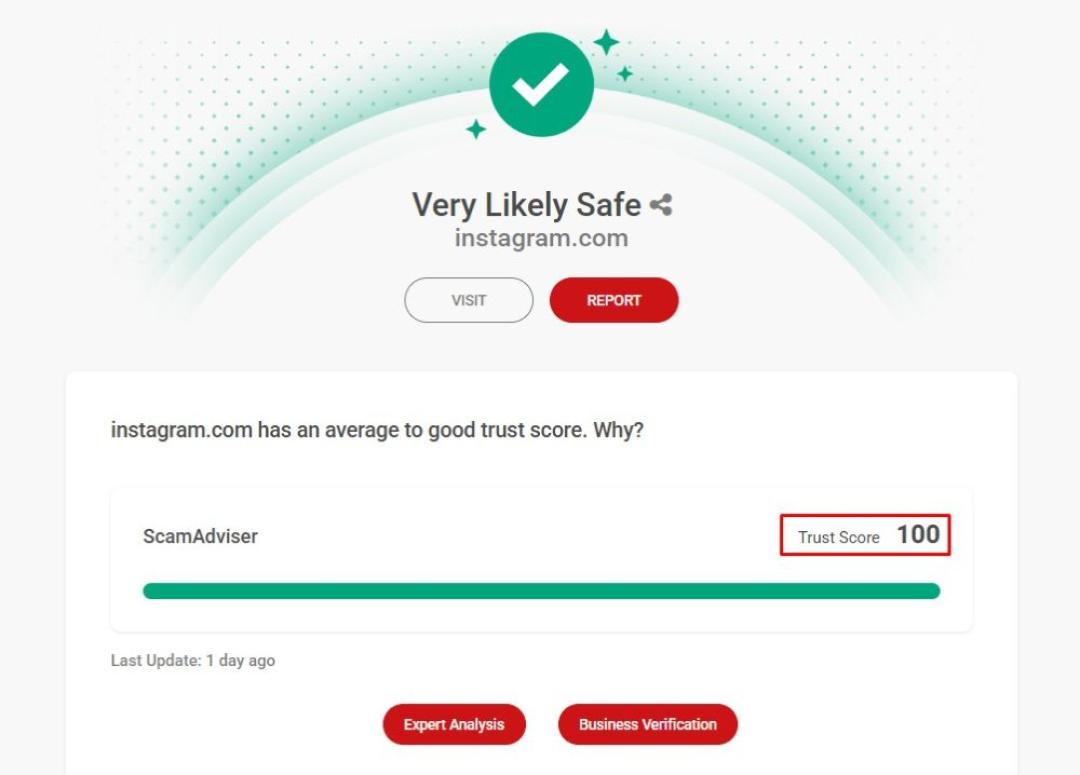
Once you complete your check, you will see the website’s Trust Score based on 40+ independent data points (Image Credit: ScamAdviser)
A website legit checker compares public, technical, and reputation data to find signs that may support or weaken trust.
Domain age means how long the web address has existed. A new domain does not prove fraud, but it weakens trust when the site claims a long company history or thousands of customers.
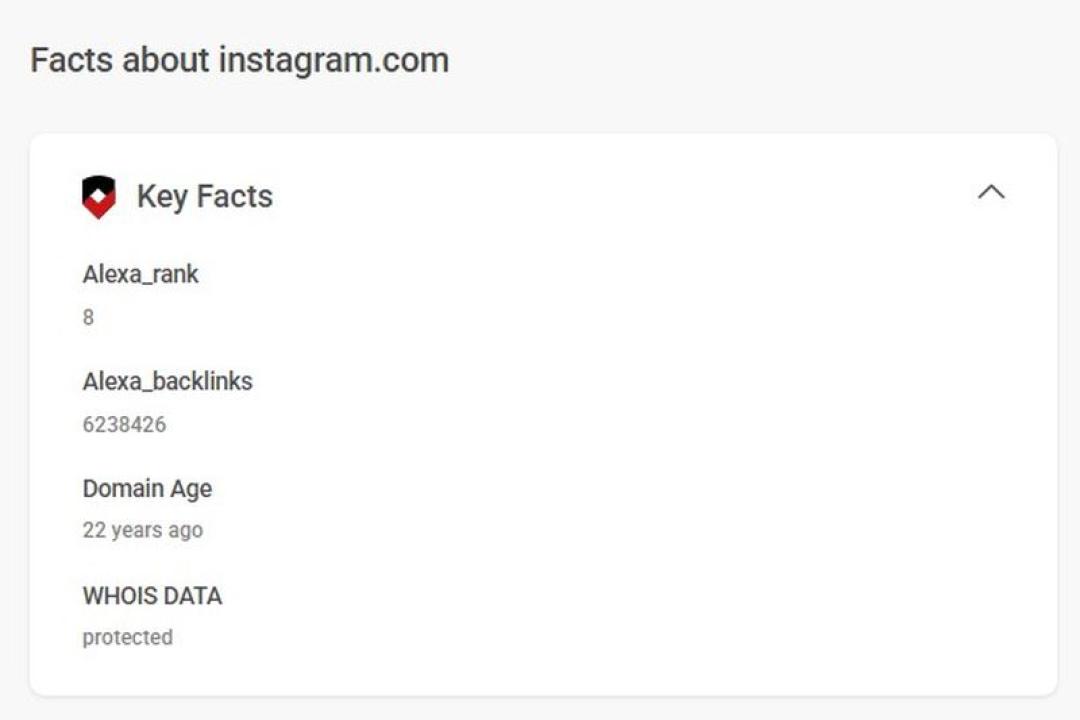
Domain age can be found under “Key Facts” when you check a website (Image Credit: ScamAdviser)
A real business should give you contact details that you can verify outside its own website. Missing addresses, copied company names, personal email accounts, or phone numbers that do not work deserve caution.
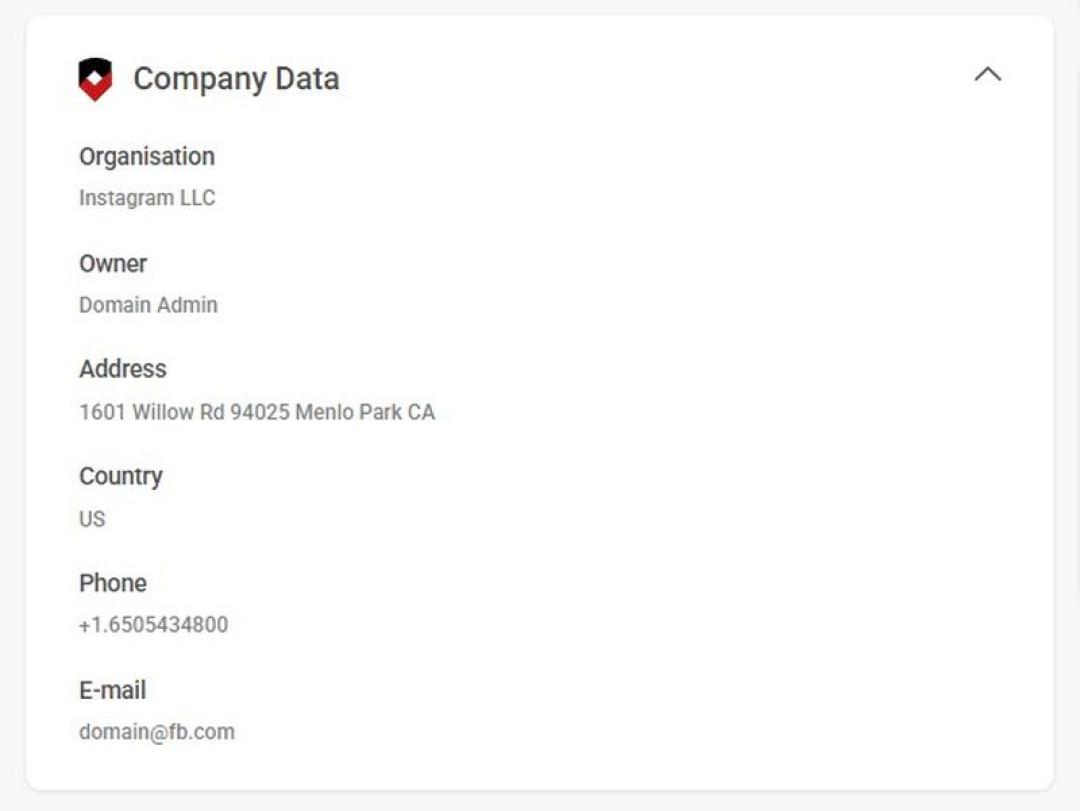
You can find the organization name and phone number under “Company Data” (Image Credit: ScamAdviser)
Traffic, independent reviews, and user reports can show whether other people know the website. A site that claims to be popular but has little public history may need closer review.
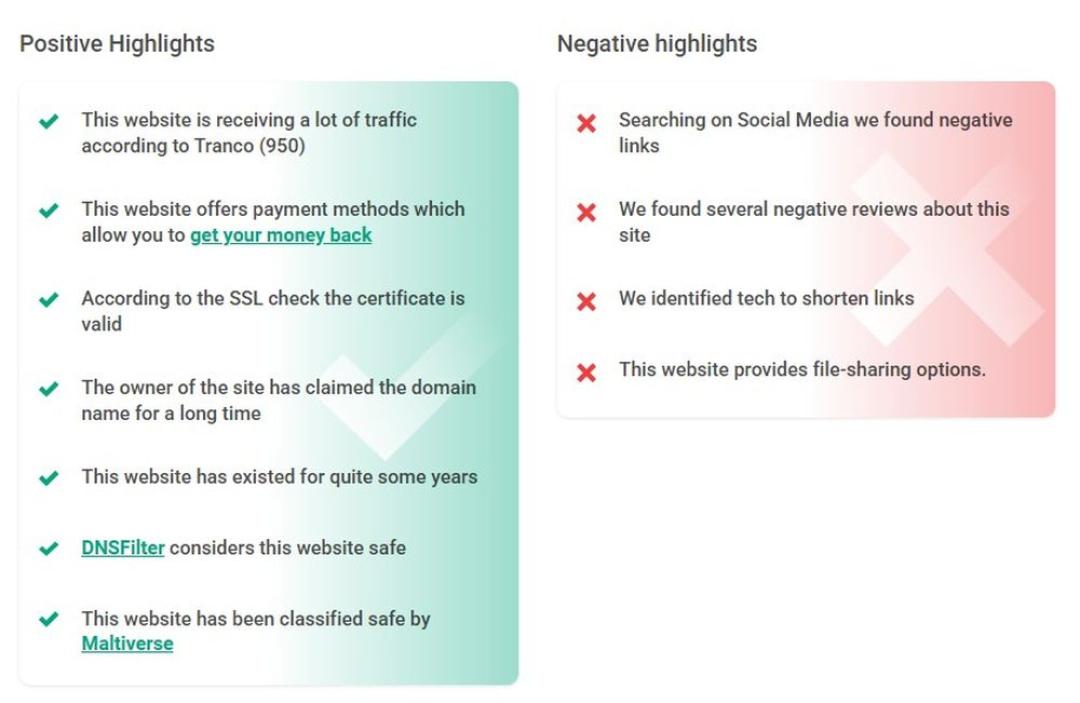
For each website, you will find positive and negative highlights (Image Credit: ScamAdviser)
A secure connection protects data between your browser and the website. However, HTTPS and an SSL certificate do not prove that the company behind the site is honest.
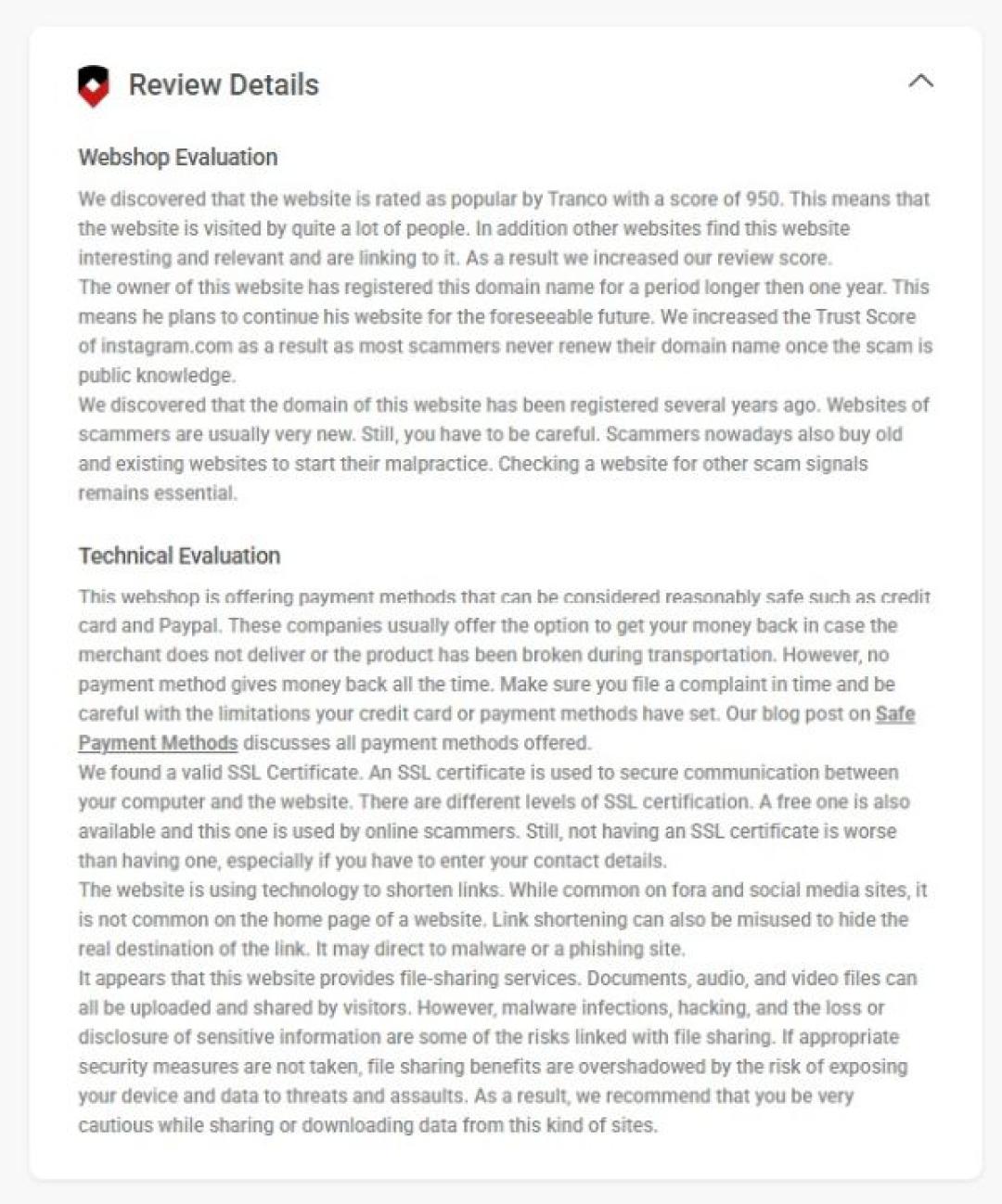
Technical evaluation is at the top menu under “Review Details” (Image Credit: ScamAdviser)
Reviews can add useful context, but fake positive reviews and unfair negative reviews both exist. Look for repeated wording, sudden review activity, and complaints that describe the same problem.
A checker gives you a useful starting point, but your own review matters.
Look for misspellings, added words, unusual domain endings, and copied brand names. A fake site may use a web address that looks close to the real one.
Search the company name, domain, address, and phone number. Compare the details with business registers, independent reviews, and other trusted sources.
Read the return policy before you buy. Missing legal pages, vague refund terms, copied text, or unclear contact details are common warning signs.
For a deeper shopping check, read our guide to fake shopping websites.
Large discounts on expensive or hard-to-find products deserve extra research. Compare the price with established stores before you pay.
Review the Payment Methods
Credit cards and trusted payment services may give you a way to dispute a payment. Be careful when a seller demands bank transfers, cryptocurrency, gift cards, or other payments that are hard to reverse.
Messages such as “only today,” “last item available,” or “complete payment now” try to rush your decision. Leave the page and review the site before you act.
You can find more checks in ScamAdviser’s guide to recognizing a scam website.
A website may be safe to visit but unsafe to buy from. Before you place an order, review the seller’s company history, delivery terms, return policy, independent reviews, prices, and payment protection.
If you want to know how to check if a shopping website is legit, start with the seller’s history, policies, reviews, and payment options. A polished design or a secure connection does not confirm that the seller will send the product or honor a refund.
Contact your bank or payment provider as soon as possible and ask whether the payment can be stopped, disputed, or reversed. Save receipts, order confirmations, messages, and screenshots.
Change any password that you reused on the website. Watch your bank account and email account for unusual activity.
Read ScamAdviser’s guide on how to get your money back after a scam, then report the scam so other users can find the warning.
Both ScamAdviser and VirusTotal are tools designed to help you steer clear of online threats — but they’re built for slightly different missions.
In short:
VirusTotal is more like a digital microscope. It scans files and URLs using over 70 antivirus engines and blacklist databases. If you’re a cybersecurity pro or you’ve downloaded something suspicious, VirusTotal is your go-to. You can upload a file, paste a link, or even use their API to run deep scans for malware or phishing attempts. It’s powerful, technical, and widely used by researchers and security teams.
ScamAdviser, on the other hand, is your street-smart friend. It doesn’t just look for malware — it looks at the bigger picture. Who owns the site? How old is the domain? Are real people visiting it, or is it a digital ghost town? ScamAdviser’s Trust Score gives you a quick, easy-to-understand answer: Is this site likely to be a scam?
Use both together, and you’ve got yourself a solid scam-spotting combo.
Scam spotting doesn’t stop at your desktop. The ScamAdviser app, available on both iOS and Android, puts the power of our website checker right in your pocket. Whether you’re shopping from your phone or checking a suspicious link someone texted you, you can get instant Trust Scores anytime, anywhere.
Scam protection has never been more mobile.
How can I check if a website is legit?
Use a website legit checker, then verify the domain, company details, reviews, policies, prices, and payment methods.
Can a website have HTTPS and still be a scam?
Yes, HTTPS protects the connection, but it does not prove that the business behind the website is honest.
How can I check if a website is safe to buy from?
Review the Trust Score, company history, return policy, independent reviews, prices, and payment protection before you buy.
What does a low ScamAdviser Trust Score mean?
A low Trust Score means ScamAdviser found warning signs that deserve further review before you trust the website.
Can a new website be legitimate?
Yes, but a new website needs more verification when it claims a long history or asks for advance payment.
