ZH
我们都有过这样的经历。你发现了一笔好得令人难以置信的交易。一个华而不实的网站以一半的价格出售一个名牌手提包。或者一个神秘的科技小玩意儿,只有在这里才有存货。但在你点击 "立即购买 "之前,有一个大问题要问:
这个网站安全吗?
这就是诈骗网站检查器的用武之地--它是你的数码助手,能在黑心网站掏空你的钱包(以及你对人类的信任)之前将其揪出来。
可以把它想象成互联网上的测谎仪。欺诈网站检查器也叫 URL 检查器或网站合法性检查器,它能快速分析网站,并告诉你它是安全的还是可疑的。
它可以查看以下内容
基本上,它可以帮你完成所有的数字侦查工作。
好消息:您不需要成为技术天才。使用我们的工具就像复制、粘贴和点击一样简单。
具体方法如下:
专业提示:不确定分数的含义?别担心,我们会用通俗易懂的英语进行解释。这里没有极客术语。
ScamAdviser 和 VirusTotal 都是旨在帮助您远离在线威胁的工具,但它们的任务略有不同。
VirusTotal 更像是数字显微镜。它使用 70 多种反病毒引擎和黑名单数据库扫描文件和 URL。如果你是网络安全专家,或者下载了可疑的文件,VirusTotal 就是你的最佳选择。您可以上传文件、粘贴链接,甚至使用其 API 对恶意软件或网络钓鱼企图进行深度扫描。它功能强大,技术性强,被研究人员和安全团队广泛使用。
另一方面,ScamAdviser 是你的街头智能朋友。它不仅能查找恶意软件,还能纵观全局。网站的所有者是谁?域名的历史有多长?是真的有人访问,还是一个数字鬼城?ScamAdviser 的 "信任分数 "能为您提供快速、易懂的答案:这个网站可能是个骗局吗?
简而言之
将二者结合使用,你就拥有了一个可靠的骗局识别组合。
ScamAdviser 不仅仅是一个工具,它还是一个全球监督机构。我们与葡萄牙的DECO Proteste等值得信赖的消费者保护组织以及欧洲、亚洲和非洲的其他组织合作,不断改进我们的检查工具,以满足本地需求。这意味着 ScamAdviser 会说您的语言(字面意思),并能标出您在其他地方可能看不到的特定地区的诈骗趋势。
我们还在幕后与网络安全研究人员、执法部门和各国政府合作,关闭欺诈网站,让每个人都能享受更安全的网络。
因此,当您使用 ScamAdviser 时,您不仅仅是在检查一个网站,而是在加入一个全球反欺诈网络。
有时候,你的直觉已经知道了。但如果你不确定,这里有一些典型的诈骗网站提示:
如果你看到两个或更多这样的评论?是时候点击返回按钮了。
首先,深呼吸。这种情况时有发生。
该怎么做?
坏消息:骗子越来越聪明。
好消息:你也一样。
以下是如何保护你的数字自我:
发现骗局并不局限于您的电脑桌面。 ScamAdviser应用程序可在 iOS和Android上使用,将我们网站检查程序的强大功能放在您的口袋里。无论您是用手机购物,还是查看别人发给您的可疑链接,您都可以随时随地获得即时的信任分数。
诈骗保护从未像现在这样移动化。
互联网有点像狂野的西部--充满了巨大的交易和数字亡命之徒。
不过,有了 ScamAdviser 这样的欺诈网站检查工具,你就有了一个值得信赖的套索,可以在坏人下手之前就抓住他们。
下次当你想知道 "这个网站安全吗?检查一下吧。
现在就试试 ScamAdviser 的网站检查器吧,它免费、快速,也许能让您免于一场骗局噩梦。
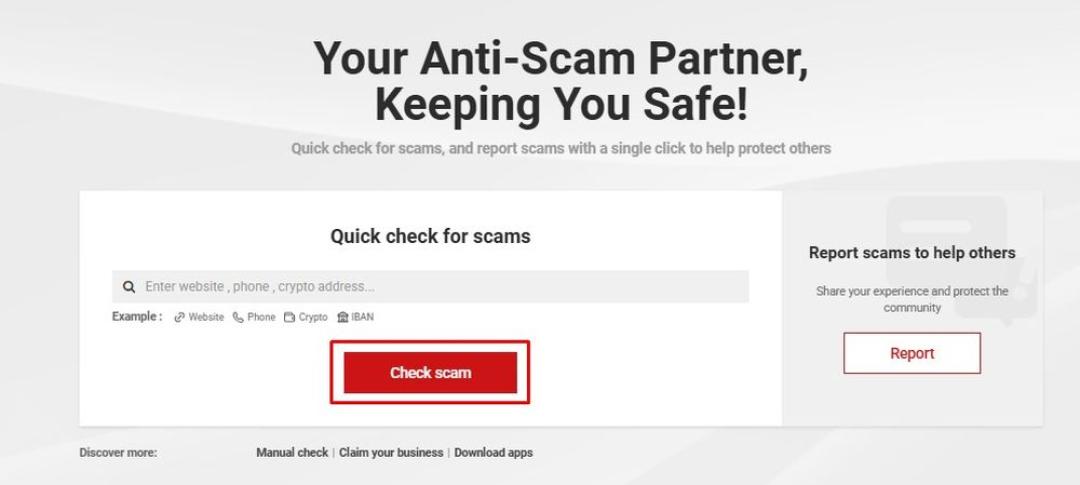
Simply put the website domain, phone number, crypto address, or IBAN and hit “Check Scam” (Image Credit: ScamAdviser)
The ScamAdviser Trust Score is a number between 1 and 100 that shows how likely a website is to be safe and trustworthy. A higher score means the site has more positive signals, while a lower score means ScamAdviser found more warning signs.
The score is a risk indicator, not a final verdict. ScamAdviser checks more than 40 independent data sources, and no single signal decides the result. You can read the full explanation in the ScamAdviser Trust Score guide.
A low score deserves more research before you continue. A high score still requires caution because legitimate websites can be hacked, business details can change, and marketplace sellers may act independently from the platform.
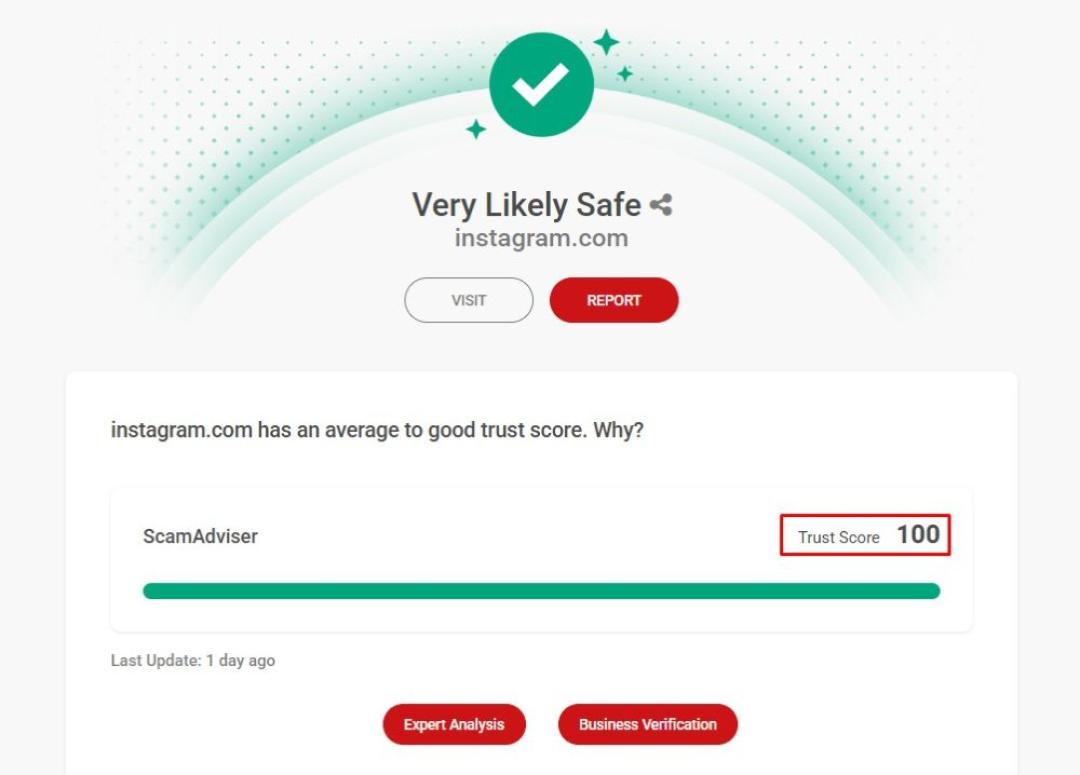
Once you complete your check, you will see the website’s Trust Score based on 40+ independent data points (Image Credit: ScamAdviser)
A website legit checker compares public, technical, and reputation data to find signs that may support or weaken trust.
Domain age means how long the web address has existed. A new domain does not prove fraud, but it weakens trust when the site claims a long company history or thousands of customers.
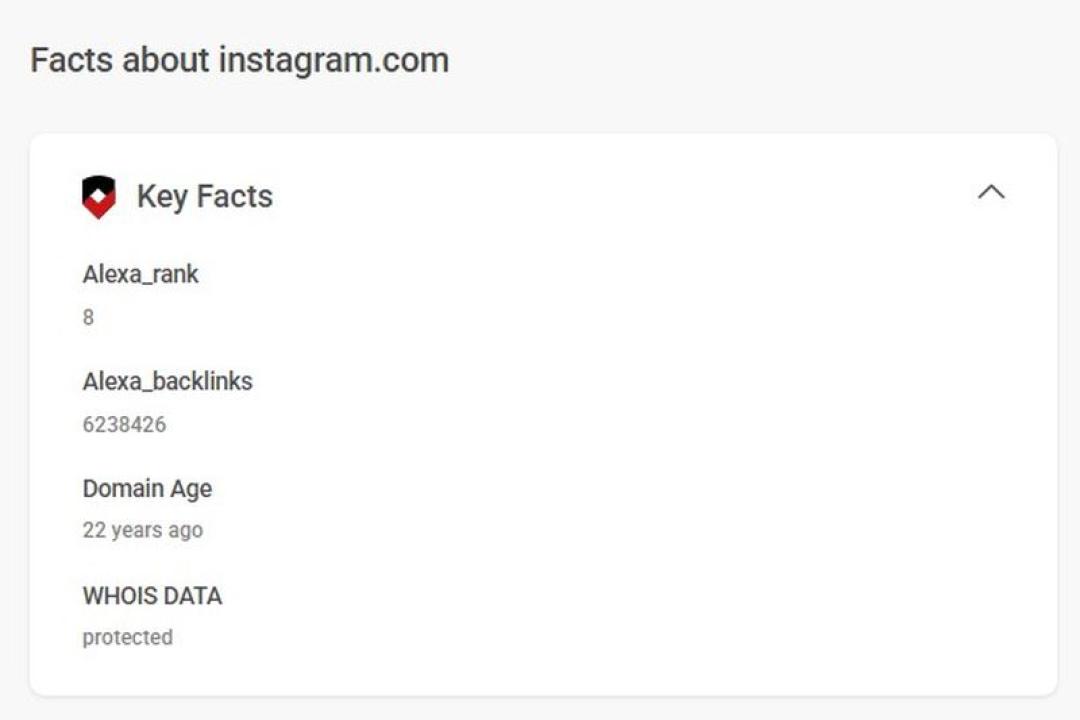
Domain age can be found under “Key Facts” when you check a website (Image Credit: ScamAdviser)
A real business should give you contact details that you can verify outside its own website. Missing addresses, copied company names, personal email accounts, or phone numbers that do not work deserve caution.
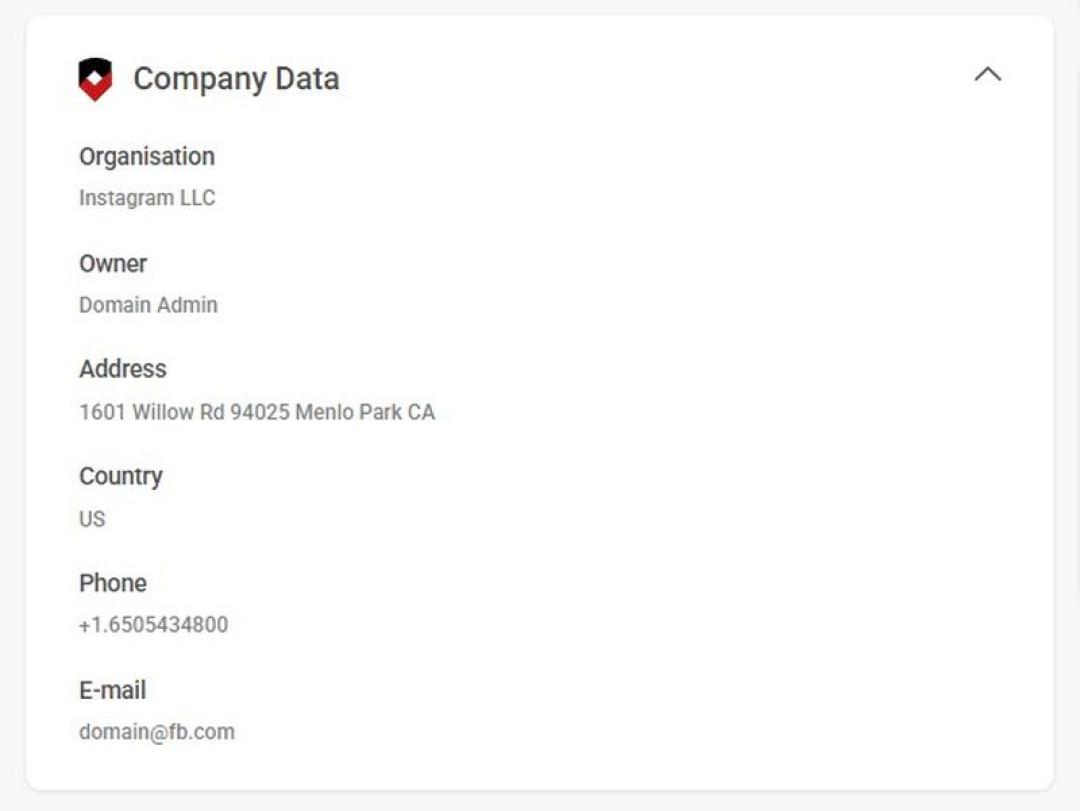
You can find the organization name and phone number under “Company Data” (Image Credit: ScamAdviser)
Traffic, independent reviews, and user reports can show whether other people know the website. A site that claims to be popular but has little public history may need closer review.
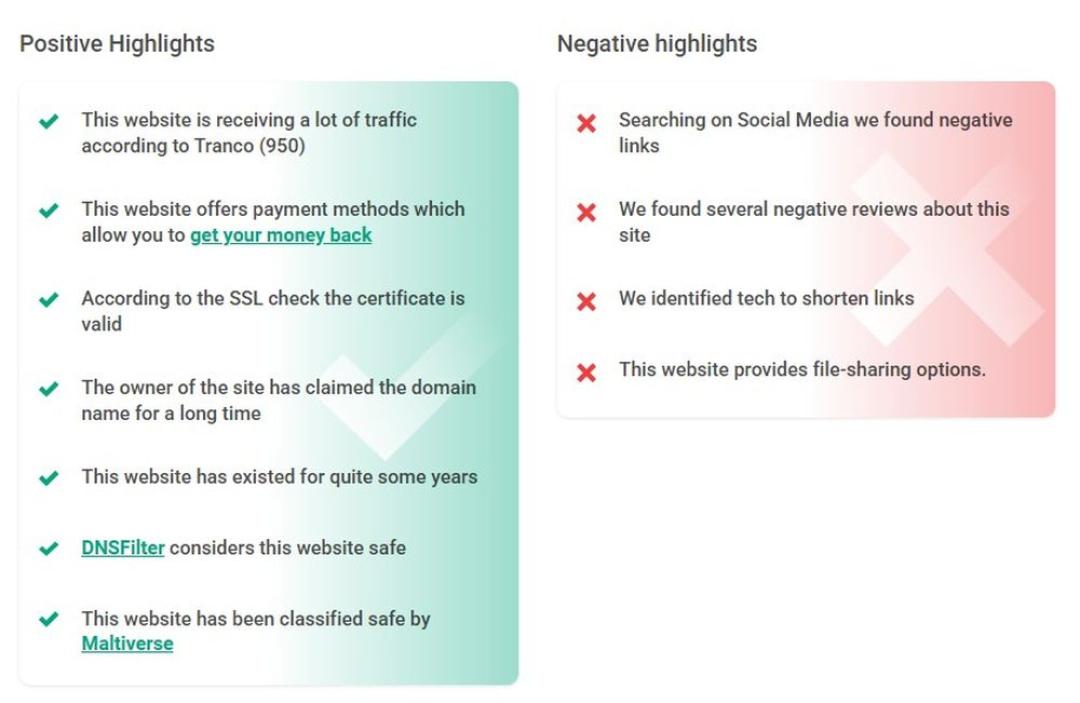
For each website, you will find positive and negative highlights (Image Credit: ScamAdviser)
A secure connection protects data between your browser and the website. However, HTTPS and an SSL certificate do not prove that the company behind the site is honest.
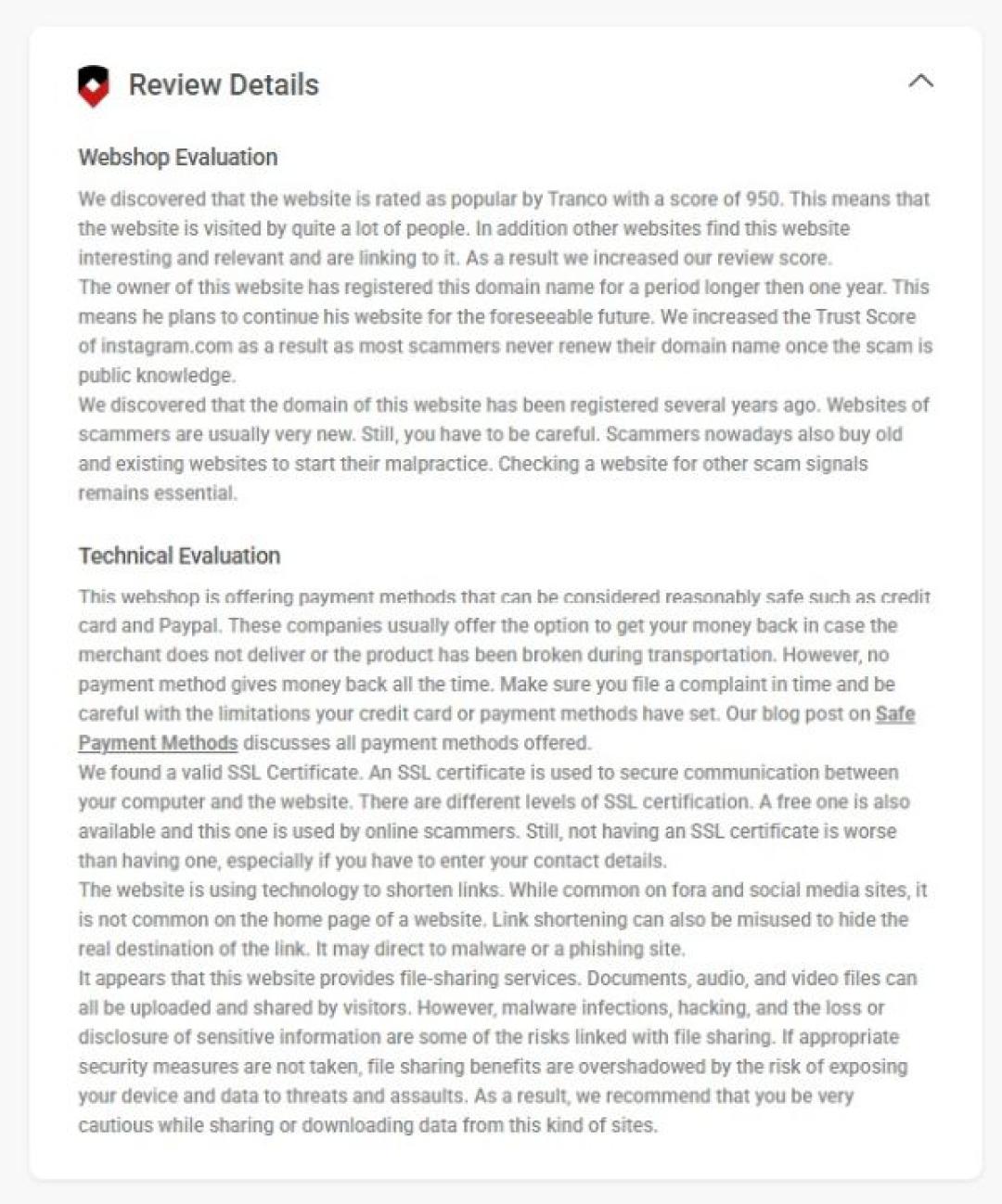
Technical evaluation is at the top menu under “Review Details” (Image Credit: ScamAdviser)
Reviews can add useful context, but fake positive reviews and unfair negative reviews both exist. Look for repeated wording, sudden review activity, and complaints that describe the same problem.
A checker gives you a useful starting point, but your own review matters.
Look for misspellings, added words, unusual domain endings, and copied brand names. A fake site may use a web address that looks close to the real one.
Search the company name, domain, address, and phone number. Compare the details with business registers, independent reviews, and other trusted sources.
Read the return policy before you buy. Missing legal pages, vague refund terms, copied text, or unclear contact details are common warning signs.
For a deeper shopping check, read our guide to fake shopping websites.
Large discounts on expensive or hard-to-find products deserve extra research. Compare the price with established stores before you pay.
Review the Payment Methods
Credit cards and trusted payment services may give you a way to dispute a payment. Be careful when a seller demands bank transfers, cryptocurrency, gift cards, or other payments that are hard to reverse.
Messages such as “only today,” “last item available,” or “complete payment now” try to rush your decision. Leave the page and review the site before you act.
You can find more checks in ScamAdviser’s guide to recognizing a scam website.
A website may be safe to visit but unsafe to buy from. Before you place an order, review the seller’s company history, delivery terms, return policy, independent reviews, prices, and payment protection.
If you want to know how to check if a shopping website is legit, start with the seller’s history, policies, reviews, and payment options. A polished design or a secure connection does not confirm that the seller will send the product or honor a refund.
Contact your bank or payment provider as soon as possible and ask whether the payment can be stopped, disputed, or reversed. Save receipts, order confirmations, messages, and screenshots.
Change any password that you reused on the website. Watch your bank account and email account for unusual activity.
Read ScamAdviser’s guide on how to get your money back after a scam, then report the scam so other users can find the warning.
Both ScamAdviser and VirusTotal are tools designed to help you steer clear of online threats — but they’re built for slightly different missions.
In short:
VirusTotal is more like a digital microscope. It scans files and URLs using over 70 antivirus engines and blacklist databases. If you’re a cybersecurity pro or you’ve downloaded something suspicious, VirusTotal is your go-to. You can upload a file, paste a link, or even use their API to run deep scans for malware or phishing attempts. It’s powerful, technical, and widely used by researchers and security teams.
ScamAdviser, on the other hand, is your street-smart friend. It doesn’t just look for malware — it looks at the bigger picture. Who owns the site? How old is the domain? Are real people visiting it, or is it a digital ghost town? ScamAdviser’s Trust Score gives you a quick, easy-to-understand answer: Is this site likely to be a scam?
Use both together, and you’ve got yourself a solid scam-spotting combo.
Scam spotting doesn’t stop at your desktop. The ScamAdviser app, available on both iOS and Android, puts the power of our website checker right in your pocket. Whether you’re shopping from your phone or checking a suspicious link someone texted you, you can get instant Trust Scores anytime, anywhere.
Scam protection has never been more mobile.
How can I check if a website is legit?
Use a website legit checker, then verify the domain, company details, reviews, policies, prices, and payment methods.
Can a website have HTTPS and still be a scam?
Yes, HTTPS protects the connection, but it does not prove that the business behind the website is honest.
How can I check if a website is safe to buy from?
Review the Trust Score, company history, return policy, independent reviews, prices, and payment protection before you buy.
What does a low ScamAdviser Trust Score mean?
A low Trust Score means ScamAdviser found warning signs that deserve further review before you trust the website.
Can a new website be legitimate?
Yes, but a new website needs more verification when it claims a long history or asks for advance payment.
